Architecture Overview
The AI Imaging Agent uses a two-stage pipeline that combines fast text retrieval with vision-language model selection to recommend imaging tools.
System Architecture
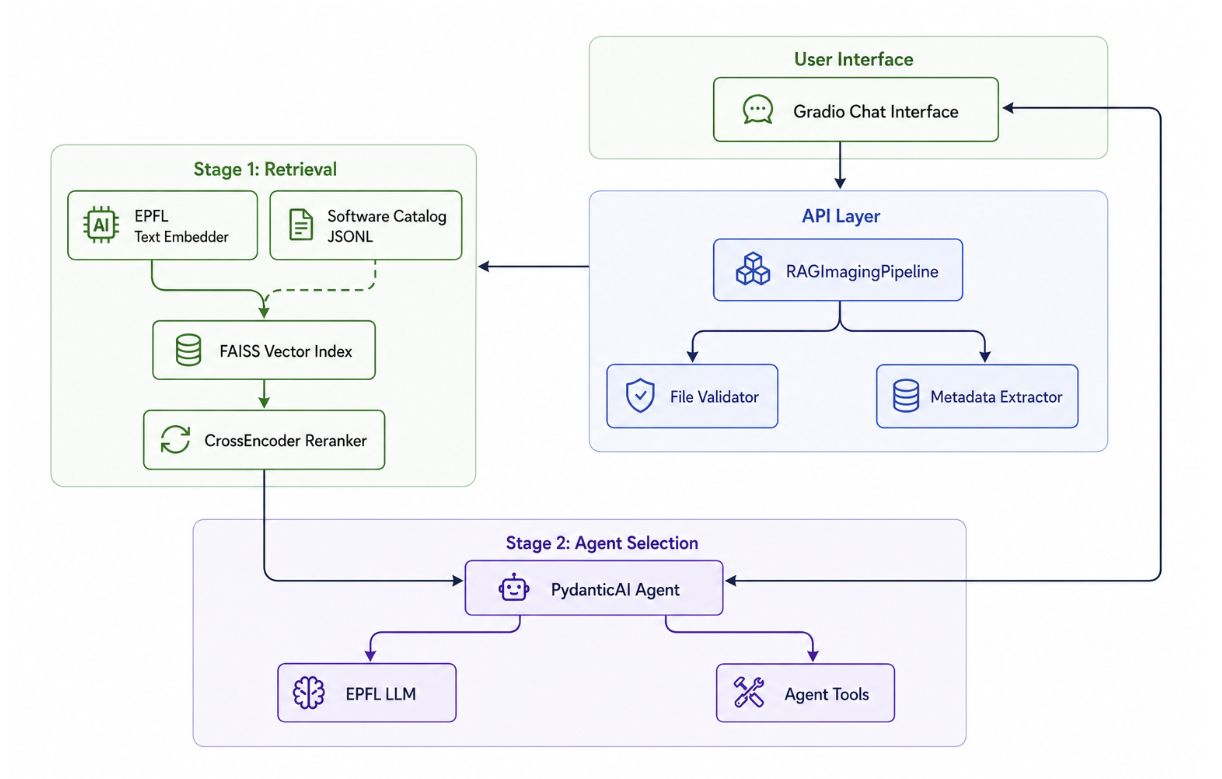
Design Principles
1. Two-Stage Pipeline
Why two stages?
- Speed: Text retrieval is fast (~100ms), VLM calls are slower (~2-5s)
- Cost: Only run expensive VLM on top candidates
- Quality: Combine semantic search (Stage 1) with reasoning (Stage 2)
2. No Generation in Retrieval
Stage 1 uses no LLMs:
- Deterministic text search
- Reproducible results
- Fast iteration
- Lower cost
3. Single VLM Call in Selection
Stage 2 makes exactly one VLM call:
- Sees all candidates at once
- Performs comparative reasoning
- Returns complete rankings
- Efficient use of context window
4. Vision + Text Integration
VLM receives:
- Visual: PNG preview of image
- Textual: Query, metadata, candidate descriptions
- Structured: Candidate metadata table
Enables image-aware tool selection.
Data Flow
Input Processing
User uploads: scan.dcm
              "Segment the lungs"

↓ File Validation
  - Size check (< 200MB for DICOM)
  - Format validation
  - Security checks

↓ Metadata Extraction
  - Format: DICOM
  - Modality: CT
  - Dimensions: 512×512×300 (3D)
  - Spacing: 0.7×0.7×1.5mm

↓ Preview Generation
  - Extract middle slice: scan_preview.png
  - Format: PNG, RGB
  - Preserve metadata separately
Stage 1: Retrieval
Query: "Segment the lungs"
Uploaded: scan.dcm (DICOM, CT, 3D)

↓ Query Enhancement
  Enhanced: "Segment the lungs format:DICOM format:CT format:3D"

↓ Metadata-Aware Hinting
  + image metadata summary (modality/anatomy/dims)

↓ Embedding (BGE-M3)
  Vector: [0.23, -0.15, 0.87, ..., 0.34]  # 1024 dims

↓ FAISS Search
  Top 20 candidates by cosine similarity

↓ Retry Broadening (if low results)
  retry with a shorter query formulation

↓ CrossEncoder Reranking
  Re-score with cross-attention
  Top 8 candidates

→ Candidates passed to Stage 2
Stage 2: Agent Selection
Inputs:
  - User query: "Segment the lungs"
  - Image preview: scan_preview.png
  - Candidates: [tool1, tool2, ..., tool8]
  - Metadata: DICOM, CT, 3D, 512×512×300

↓ VLM Prompt Construction
  System: "You are an imaging tool expert..."
  User text: Query + metadata + candidate table
  User image: PNG preview

↓ VLM Call (GPT-4o)
  - Analyzes image content (CT thorax)
  - Reads candidate descriptions
  - Considers format compatibility
  - Reasons about task alignment

↓ Response (Structured)
  {
    "status": "complete",
    "recommendations": [
      {
        "rank": 1,
        "name": "TotalSegmentator",
        "accuracy": 95,
        "explanation": "...",
        "reason": "task_match"
      },
      ...
    ]
  }

→ Formatted recommendations to user
Key Components
api/pipeline.py
RAGImagingPipeline: Main orchestrator
class RAGImagingPipeline:
    def __init__(self, catalog_path, index_dir):
        self.retriever = TextRetriever(...)
        # Stage 2 (selection/ranking) is handled by the PydanticAI agent
        # configured in generator/prompts.py using models from generator/schema.py

    def recommend(self, query, files):
        # Stage 1: Retrieval
        candidates = self.retriever.retrieve(query)

        # Stage 2: Selection via PydanticAI agent
        recommendations = run_selection_agent(
            query=query,
            candidates=candidates,
            files=files,
        )

        return recommendations
Responsibilities:
- File validation
- Metadata extraction
- Pipeline orchestration
- Error handling
retriever/
Text-based retrieval, no LLMs
Components:
text_embedder.py: BGE-M3 embedding modelvector_index.py: FAISS index managementreranker.py: CrossEncoder rerankingsoftware_doc.py: Catalog schema and loading
Retrieval flow:
- Embed query → vector
- FAISS search → top-N by similarity
- CrossEncoder → rerank with cross-attention
- Return top-K candidates
generator/
VLM-based tool selection building blocks
Components:
schema.py: Pydantic models for agent responses and tool recommendationsprompts.py: System and tool-selection prompts used by the PydanticAI agent
Selection logic:
- Implemented in the PydanticAI agent (
agent/agent.py) using these schemas and prompts - Single VLM call with all candidates
- Structured output (Pydantic schemas) with ranked recommendations
- Vision + text multimodal input
agent/
PydanticAI conversational agent
Components:
agent.py: Agent definition and toolsstate.py: ChatState dataclasstools.py: Agent tools (search, repo_info, demo_exec)
Tools:
search_alternative: Request alternative searchrepo_info: Fetch GitHub repository detailsrun_gradio_demo: Execute Gradio Space demos
utils/
Shared utilities
image_meta.py: DICOM/NIfTI/TIFF metadata extractionfile_validator.py: Size and format validationpreviews.py: Image conversion to PNGtags.py: Control tag parsing ([EXCLUDE:...], etc.)config.py: Configuration management
ui/
Gradio interface
Components:
app.py: Gradio applicationcomponents.py: Reusable UI componentshandlers.py: Message handlersformatters.py: Response formattingvisualizations.py: Previews and traces
Key function:
def respond(message: str, files: list, state: dict) -> tuple:
    """
    Main interaction function.

    Returns: (reply, media, updated_state)
    """
Module Boundaries
Clear separation of concerns:
| Module | Purpose | Dependencies |
|---|---|---|
api/ |
Pipeline orchestration | retriever/, generator/, utils/ |
retriever/ |
Text search only | None (pure retrieval) |
generator/ |
VLM selection only | None (pure generation) |
agent/ |
Conversational logic | api/, utils/ |
ui/ |
Interface only | agent/, api/ |
utils/ |
Shared functionality | None (pure utilities) |
Benefits:
- Independent testing
- Clear interfaces
- Modular replacement
- No circular dependencies
Data Schemas
Software Catalog
JSONL format, based on schema.org SoftwareSourceCode:
{
  "name": "TotalSegmentator",
  "description": "Automated multi-organ segmentation...",
  "url": "https://github.com/wasserth/TotalSegmentator",
  "codeRepository": "https://github.com/wasserth/TotalSegmentator",
  "programmingLanguage": "Python",
  "license": "Apache-2.0",
  "keywords": ["segmentation", "medical-imaging", "CT"],
  "applicationCategory": "Medical Imaging",
  "operatingSystem": ["Linux", "Windows", "macOS"],
  "softwareRequirements": ["Python 3.9+", "PyTorch"],
  "supportingData": {
    "modalities": ["CT", "MRI"],
    "dimensions": ["3D"],
    "formats": ["DICOM", "NIfTI"],
    "tasks": ["segmentation"],
    "demo_url": "https://huggingface.co/spaces/..."
  }
}
Agent Response
Pydantic models in generator/schema.py:
class ToolRecommendation(BaseModel):
    rank: int
    name: str
    accuracy_score: int  # 0-100
    explanation: str
    reason: ToolReason  # Enum
    supporting_data: dict

class AgentResponse(BaseModel):
    status: ConversationStatus  # Enum
    recommendations: list[ToolRecommendation]
    message: str | None
Validation:
- Type checking via Pydantic
- Enum constraints
- Field aliases for LLM compatibility
Extension Points
Adding New Models
In config.yaml:
available_models:
  - display_name: "Custom Model"
    name: "model-name"
    base_url: "https://api.example.com/v1"
    api_key_env: "CUSTOM_API_KEY"
Adding New Tools
Add a tool in agent/agent.py and route implementation to agent/tools/ modules:
@agent.tool
async def new_tool(ctx: RunContext[AgentState], param: str) -> str:
  """Tool description for the agent."""
  # Delegate to ai_agent.agent.tools.* implementation
  return result
Custom Metadata Extractors
In utils/image_meta.py:
def extract_custom_format(file_path: str) -> dict:
    """Extract metadata from custom format."""
    # Implementation
    return metadata
Security Considerations
User Data
- Images: Sent to OpenAI API (preview PNG) if gpt is selected
- Metadata: Processed locally, sent to VLM as text
- Queries: Sent to OpenAI API
Privacy: User data sees OpenAI's VLM API only.
Catalog Integrity
- Software catalog is curated
- SHA1 checksums verify integrity
- No user-generated catalog entries
Demo Execution
- Calls external Gradio Spaces (user choice)
- No credentials shared with demos
- User's image uploaded to public spaces (warn users)
Future Improvements
The following areas are planned for future development:
UX/UI Enhancements
The current Gradio interface is functional but has room for improvement. Planned work includes better result presentation, improved file management UX, and a more polished visual design to lower the barrier for non-expert users.
MCP Integration by Users
Today, MCP (Model Context Protocol) tool adapters are defined by the development team. A future goal is to allow users to register and contribute their own MCP-compatible tools directly from the interface, making the catalog extensible without requiring code changes.
SQLite Integration
Conversation history, tool usage logs, and per-session state currently live only in memory. Adding a SQLite backend would enable persistent sessions, usage analytics, and a foundation for personalised recommendations over time. - Explore Software Catalog
Next Steps
- Deep dive into Retrieval Pipeline
- Learn about Agent & VLM Selection